
Connecting a fire alarm panel to SCADA should improve visibility without transferring authority. A well-designed scada fire alarm interface shares selected status data while leaving detection, notification, and other life-safety functions under the panel’s control. That boundary is the starting point for a responsible integration.
The concern is practical: a poorly scoped or tested interface can leave operators unsure which system owns an alarm or status signal. The panel must continue to operate independently, while SCADA receives only the information needed for operational monitoring. The panel’s documented outputs, supported protocols, and project design determine how that data can be shared.
This guide covers interface architecture, signal mapping, and staged testing, commissioning, and ongoing validation. It also explains where a gateway or protocol converter can fit into an engineered integration. NET WIZARDS supplies a Fire Alarm Gateway alongside Industrial Networking Equipment and other integration products. The objective is clear: improve operational visibility without blurring system responsibilities.
Key Takeaways
- Keep the fire alarm panel responsible for its designed life-safety functions. Treat SCADA as a monitoring destination for approved data.
- A scada fire alarm interface depends on panel-supported outputs, compatible communications, and deliberate signal interpretation, not protocol conversion alone.
- Use panel documentation and SCADA requirements to select and map signals, then test each system boundary before handover.
- NET WIZARDS’ Fire Alarm Gateway is part of its wider portfolio of Industrial Networking Equipment, Industrial IoT sensors, gateways, and protocol converters.
Table of Contents
- What a SCADA Fire Alarm Interface Does, and What It Must Not Replace
- How the SCADA Fire Alarm Interface Moves Data Between Systems
- How to Assess Interface Options Without Compromising System Responsibilities
- How to Implement and Test a SCADA Fire Alarm Interface
- How NET WIZARDS Supports Industrial Fire Alarm Integration Planning
What a SCADA Fire Alarm Interface Does, and What It Must Not Replace
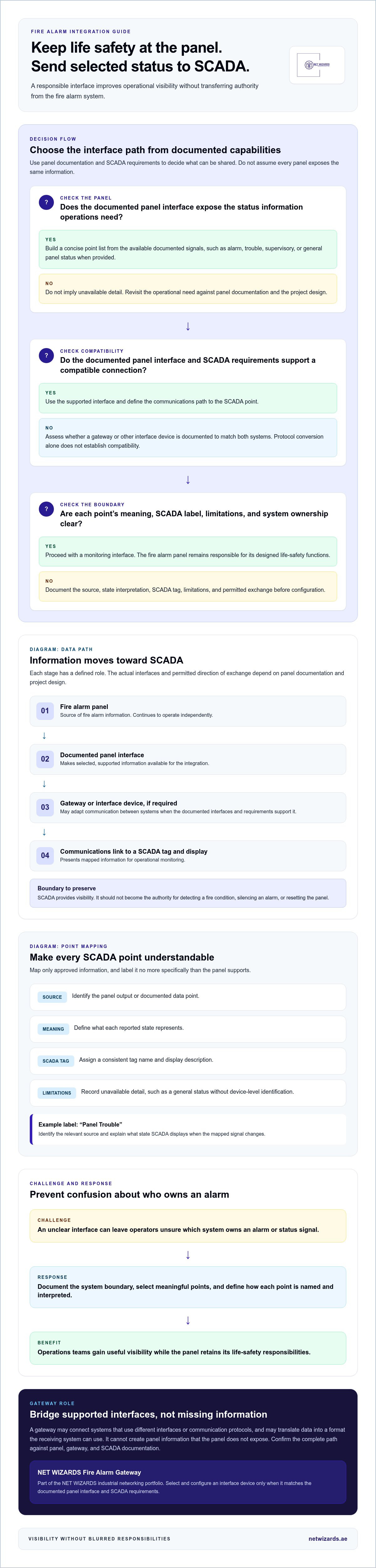
A scada fire alarm interface provides a defined route for selected information from a fire alarm panel to appear in a supervisory control and data acquisition system. Its purpose is to give operations teams useful visibility alongside other monitored equipment, not to take over fire detection or response. The panel remains the source system for fire alarm information and continues to perform its designed functions independently of SCADA.
The distinction matters. A SCADA display may help an operator see that a panel has reported an alarm or fault, but it must not become the authority for determining whether a fire condition exists or for carrying out the fire system’s assigned actions. Those responsibilities stay with the fire alarm system and its approved design. The interface should make status easier to see without creating a dependency that could affect panel operation.
Illustrative information path
Fire alarm panel → interface gateway → communications link → SCADA point
Selected panel information flows toward SCADA. The panel retains responsibility for its own functions.
Which fire alarm information may be useful in SCADA?
Useful operational points can include alarm, trouble, supervisory, or general panel status information, when the specific panel exposes those signals through its documented interface. Depending on the panel and project, teams may also need to identify a relevant zone, device, or event category. These are examples, not a guarantee that every panel provides each point or the same level of detail.
Start with operational need. A concise set of meaningful status points can help staff recognize an event and coordinate their response. Assuming SCADA can access every panel detail, however, can lead to incomplete or misleading displays. Build the point list from panel documentation and the project design.
Where should the system boundary sit?
Place the boundary between the fire panel as the information source and SCADA as a monitoring destination. Before configuration, document which data may cross that boundary, how each point will be named and interpreted, and which system owns any related decision or action. This prevents a visible SCADA point from being mistaken for permission to control the fire system.
For example, an operator might see a panel status change in SCADA and follow the site’s established response process. That does not mean SCADA should initiate a panel function, silence an alarm, or reset the panel. Make the permitted exchange explicit. Site engineering and the panel’s documented interface determine the actual boundary.
SCADA platforms collect and present information from connected field systems. The overview of SCADA systems describes their supervisory role and typical components. In a fire alarm integration, that role should remain clear: provide operational visibility while the panel retains its defined fire-system responsibilities. The challenge is balancing useful information with a safe, well-understood separation of duties. Address it with a documented scope, deliberately selected points, and a one-way monitoring path wherever the project design supports one.
How the SCADA Fire Alarm Interface Moves Data Between Systems
A typical data path starts at an interface documented for the fire alarm panel. Selected information passes to a gateway or other interface device, then across a communications link to a defined point in SCADA. Each part has a distinct job: the panel exposes available information, the gateway may adapt how it is communicated, and SCADA receives and presents the mapped point.
Illustrative data flow
Fire alarm panel → documented panel interface → gateway or interface device → communications link → SCADA tag and display
Information flows toward SCADA. The actual interfaces and direction of permitted exchange depend on the panel documentation and project design.
What does the gateway do in the integration path?
A gateway can connect systems that use different interfaces or communication protocols. Its role may include translating data into a format the receiving system can use, but it cannot create panel information that the panel does not expose. Select a device that matches the documented panel interface and SCADA requirements. Confirm the complete path, including each intermediate connection, before configuring points.
Protocol conversion is only one part of integration. The project must also define which signals to share, what each signal means, and how SCADA should label and display it. BACnet/IP, Modbus, or another protocol is a possible route only when the relevant panel, gateway, and SCADA documentation supports that arrangement. A familiar protocol name alone does not establish compatibility.
How are panel points represented in SCADA?
Map each approved panel point to a clear SCADA tag. Record its source, state interpretation, and known limitations. For example, a point labelled “Panel Trouble” should identify the relevant source and explain what state SCADA displays when the mapped signal changes. Avoid labels that imply more detail than the panel provides.
- Source: Identify the panel output or documented data point.
- Meaning: Define what each reported state represents.
- SCADA representation: Assign a consistent tag name and display description.
- Limitations: Record unavailable detail, such as a general status without device-level identification.
This record gives engineers and operators a shared reference for configuration and later troubleshooting. The final tag list must reflect the panel’s available data, not an assumed inventory of every alarm, event, or device. That distinction helps prevent ambiguous displays and mismatched expectations.
For broader fire alarm system context, consult the NFPA 72 National Fire Alarm and Signaling Code alongside applicable project requirements and panel documentation. A clear signal map and verified interface path help keep the integration understandable and maintainable. To discuss project-specific integration planning, share the required panel-to-SCADA data path with NET WIZARDS.
How to Assess Interface Options Without Compromising System Responsibilities
Select the interface method based on the panel’s documented capabilities and the information SCADA needs to display. A direct connection may suit a project where the panel exposes suitable outputs and SCADA can receive them as intended. A protocol gateway may be appropriate when documented interfaces differ and conversion is supported. Neither method is automatically compatible, and neither should change the fire system’s defined responsibilities.
What should engineers compare before selecting an interface?
Review the panel documentation, available outputs, supported protocols, and intended integration purpose. Then trace how each required signal will reach SCADA, including its normal and changed states, fault indication, and communication-loss behaviour. Record dependencies on panel configuration, gateway setup, and SCADA point design. This comparison exposes gaps before assumptions become configuration decisions.
Keep the assessment evidence-based. For each proposed point, identify its source in the panel documentation and the corresponding input or data object at the receiving end. If a signal’s state meaning or behaviour during communications loss is unclear, record it for design resolution rather than assigning an assumed interpretation.
How can integration avoid ambiguous control authority?
Define whether each system may originate, display, acknowledge, or act on a signal. For example, SCADA may display a panel status for operational awareness, while the panel’s own design governs its fire-system functions. Do not treat a visible point as authority to issue a command or alter panel logic. Document unresolved responsibilities for engineering review before implementation.
The challenge is not simply connecting compatible hardware. It is preventing unclear signal meaning or control ownership. A responsibility matrix, agreed by the project’s engineering stakeholders, makes the intended boundary explicit and gives configuration and testing teams a common reference.
Decision matrix for design review
- Confirmed compatibility: Panel documentation identifies the available interface and signals; the selected gateway or direct connection supports the documented path; SCADA can represent the required points and states.
- Project dependencies: Panel configuration, gateway mapping, communications arrangements, naming conventions, and SCADA display design require coordinated decisions.
- Unresolved design questions: Signal meaning is ambiguous, communication-loss behaviour is undefined, a required point is not documented, or a proposed action has unclear ownership. Resolve these items before implementation.
Use the matrix to compare options without presuming that a gateway is always necessary or that a direct connection is always simpler. A well-matched scada fire alarm interface can make approved information easier to interpret and reduce integration ambiguity. If a proposed method depends on undocumented panel behaviour, treat that as a design constraint, not a feature to assume into existence.
How to Implement and Test a SCADA Fire Alarm Interface
Commissioning should verify the complete signal path without treating the integration as a substitute for the panel’s own testing or operation. Start with documented requirements, proceed through configuration and staged checks, then record verified results for handover. The challenge is proving that SCADA displays the intended information without making unplanned changes to panel behaviour. Use the approved project test plan and site procedures to manage that boundary.
What should happen before configuration begins?
Collect the panel’s interface documentation and establish the proposed SCADA point list. Agree on each point’s name, source, state meaning, and responsible system. Decide how the project will record test evidence and who will review it. Confirm project-specific engineering approvals and site procedures with the responsible stakeholders before work begins.
Resolve the basics first. If a point’s meaning, source, or expected display is unclear, record it as an open item rather than building the uncertainty into the configuration. This reduces rework and gives the commissioning team a common basis for assessing results.
How should signal mapping and commissioning be validated?
Trace every configured SCADA point back to its documented panel source. Then follow the approved test plan to check the panel, gateway, communications path, and SCADA representation as distinct stages. Test representative normal, event, fault, and communications-loss states where the design supports those checks. Do not assume a point or test condition exists if the panel documentation and project design do not provide for it.
- Define: Approve the scope, point list, responsibilities, test plan, and required records.
- Configure: Set up the documented interface and map approved panel information to SCADA points.
- Verify: Check each system boundary and compare observed behaviour with the approved test plan.
- Handover: Record results, exceptions, corrective actions, limitations, and configuration ownership.
Commissioning flow
Panel checks → confirm documented source and expected panel indication
↓
Gateway checks → verify the configured mapping and communication behaviour
↓
SCADA checks → confirm the intended point name, state, and display
Use the project-approved sequence and procedures. The diagram describes check boundaries, not a substitute for panel-specific instructions.
At each stage, record what was tested, what was observed, and whether the result matched the agreed expectation. If a state cannot be tested under the approved procedure, document that limitation instead of implying successful validation. For exceptions, assign corrective action and retest the affected point or boundary as the project plan requires. Closeout should identify the final configuration owner and preserve mapping and test records for future maintenance.
This evidence-led workflow makes a scada fire alarm interface easier to review, troubleshoot, and hand over without inventing acceptance thresholds. Plan your fire alarm integration.
How NET WIZARDS Supports Industrial Fire Alarm Integration Planning
A dependable integration starts with clear architecture and documented system responsibilities. NET WIZARDS L.L.C supplies a Fire Alarm Gateway as part of its industrial integration portfolio. The panel’s documented interface and the intended SCADA visibility shape the project design. The objective is to make relevant information available to operations while keeping the gateway within its defined role.
Which NET WIZARDS capabilities are relevant to the integration?
NET WIZARDS supplies a Fire Alarm Gateway for fire alarm integration. It is used as a gateway within the company’s industrial solutions. The project design should define how it fits the documented panel interface and the intended SCADA data path.
NET WIZARDS also supplies Industrial Networking Equipment, Industrial IoT sensors, gateways, and protocol converters. Its smart infrastructure work includes remote fire-alarm panel detection, a relevant example of fire alarm information being incorporated into a wider system. These capabilities support planning the connection as part of an industrial system design.
A project-specific approach helps align component selection with available interfaces and operational objectives. The resulting architecture can improve access to relevant information while keeping scope and system boundaries clear.
What information helps scope an integration discussion?
Prepare the details that define the panel interface, the desired monitoring outcome, and the project context. Useful inputs include:
- Panel information: Fire alarm panel model and available interface documentation.
- Monitoring objectives: The status and event signals operations staff need to see in SCADA.
- SCADA context: Platform details, preferred point names, and signal presentation requirements.
- Project constraints: Site procedures, communications arrangements, engineering approvals, and responsible stakeholders.
These inputs focus the integration discussion on documented panel capabilities and the operational information the site needs. They also give stakeholders a practical basis for defining scope before configuration and testing.
NET WIZARDS L.L.C can discuss project requirements and the proposed role of a Fire Alarm Gateway within the interface architecture. Discuss an industrial fire alarm integration.
Move from Integration Concept to Project Planning
Give engineering, fire-system, and operations stakeholders a shared basis for project decisions. Define the operational visibility required, identify the panel and SCADA information available for design review, and assign ownership for unresolved interface questions. A clear project brief helps keep the scada fire alarm interface aligned with site operating needs as the design develops.
NET WIZARDS can support a project discussion grounded in the intended architecture and system documentation. Bring the panel details, desired SCADA points, platform requirements, and relevant site constraints into the conversation. These inputs help define a practical integration scope, rather than relying on assumptions about compatibility or signal access.
A disciplined next step turns a complex interface question into a clearer, reviewable project plan.
Frequently Asked Questions
Can a fire alarm panel connect to a SCADA system?
Yes. A panel can share selected information with SCADA when its documented interface and the project architecture support the connection. One route uses panel relay outputs connected to digital inputs; another may use an interface gateway. The appropriate method depends on the panel and receiving system. Treat the connection as an added monitoring path, not as a replacement for the panel’s own functions.
What information can a SCADA fire alarm interface display?
A scada fire alarm interface may display available status or event categories, such as alarm, fault, or supervisory indications. The panel’s interface determines whether SCADA can show only a general condition or more specific information. For example, a site may need a broad panel alarm indication for an operations overview, while detailed device identification may not be available through the chosen interface.
Does a gateway change how the fire alarm panel operates?
A gateway used only to pass approved information should not be treated as a device that changes the panel’s operating logic. Its role in the design is to connect documented interfaces or adapt data for another system. The engineering scope should define the permitted exchange and exclude unapproved commands or configuration changes. Panel documentation and project approvals govern how the interface is implemented.
Which protocol does a fire alarm to SCADA interface use?
There is no single protocol for every installation. The panel may provide relay contacts or a documented communications interface, while SCADA may accept data through a supported industrial protocol. Modbus or BACnet/IP are possibilities only when the relevant panel, gateway, and SCADA documentation supports them. Confirm the complete path rather than selecting a protocol based on SCADA capability alone.
How do you test a fire alarm interface with SCADA?
Use an approved test plan that identifies each point, its expected SCADA representation, and the procedure for exercising it. For a representative status, compare the panel indication with the gateway state and SCADA display, then record the observed result. Include fault and communication conditions only where the design and site procedures allow those tests. Document exceptions and corrective actions for review.
What happens if communication between the fire panel and SCADA fails?
SCADA may stop receiving current panel information or show a communication fault, depending on how the interface is designed. The project should define how operators distinguish unavailable or stale data from a normal status. The fire panel’s response remains governed by its own design, not by SCADA connectivity. Confirm the actual failure indication and recovery behaviour through documentation and approved testing.
Can an existing fire alarm panel be integrated with SCADA?
An existing panel can be considered for integration if it has a suitable documented output or communications interface and the SCADA system can receive the resulting points. The panel model, available interface details, and current configuration shape the scope. Some installations may expose fewer details than the project would ideally display, so define the required visibility around information the panel actually provides.