
What if the cellular router that fits your network still isn’t suitable for the area where you plan to install it? For a hazardous area cellular router, site classification and verified equipment documentation must come before connectivity features. A rugged enclosure or strong signal alone doesn’t establish suitability.
That distinction matters when teams need to confirm the site classification, identify acceptable evidence, and coordinate a router with existing industrial systems. Requirements can vary by project, so confirm the classification and documentation with the responsible project authority and relevant supplier before procurement.
This checklist helps you assess site conditions, verify equipment suitability, and plan cellular connectivity as part of an industrial network. It covers classification and documentation, environmental and equipment details, cellular coverage, interfaces, and operational requirements. Use it to identify information gaps early, before selecting hardware. The goal is a defensible evaluation process that connects safety evidence with network design, not an assumption that a particular router is certified for your site.
Key Takeaways
- Start with the site classification and project requirements. Connectivity features alone don’t establish equipment suitability.
- Evaluate a hazardous area cellular router against evidence for the exact model and proposed configuration, and record who must approve each requirement.
- Map deployment challenges to verification steps, mitigation owners, and acceptance evidence before choosing a communications option.
- Use an ordered pre-installation review to check requirements, documentation, design, installation methods, and acceptance.
- Consider Industrial Routers and LoRaWAN & Cellular Gateways within the wider network architecture, while confirming hazardous-area suitability with the relevant supplier and project authority.
Table of Contents
- What makes a cellular router suitable for a hazardous area?
- Which hazardous-area cellular router criteria should you verify?
- How do you assess router risks, constraints, and alternatives?
- What deployment checks reduce uncertainty before installation?
- How can an industrial networking partner support the next step?
What makes a cellular router suitable for a hazardous area?
A cellular connection can carry operational data, but it doesn’t establish that a device is suitable for installation in a hazardous area. A hazardous area cellular router must be assessed against the approved site classification, project requirements, and evidence for the exact equipment configuration and intended location. Treat connectivity performance and area suitability as separate acceptance questions.
Radio access and data transport describe what a router does within a network. They don’t confirm that its enclosure, installation arrangement, or protection concept is appropriate for the assessed hazards. For example, Intrinsic safety limits electrical and thermal energy to reduce ignition risk. It is one protection concept, not a general property that can be assumed from a router’s industrial design or added by placing an ordinary device in an external case.
What information should a site classification provide?
Obtain the approved area classification from the responsible project authority before comparing equipment. Record the operating location, assessed hazards, and installation conditions relevant to the proposed device. These details form the basis for review. Don’t assign a zone, gas group, temperature class, or protection level from assumptions, site labels, or an incomplete drawing. Confirm missing or conflicting information with the project authority.
Why does cellular connectivity not prove hazardous-area suitability?
Cellular capability concerns network access and data transport. It doesn’t replace equipment evidence. Check that the documentation applies to the exact router model, proposed configuration, and intended installation location. If a supplier presents ATEX or IECEx documentation, verify that it matches the project requirements and is acceptable to the responsible project authority. A certification reference alone doesn’t establish suitability for every site or configuration.
Keep the review practical. Ask the relevant supplier to confirm the model, configuration, environmental ratings, and hazardous-area documentation. At the same time, have qualified project personnel assess the proposed installation method against approved documents and site conditions. This separates verified requirements from open questions before procurement and helps prevent choosing hardware on connectivity features alone.
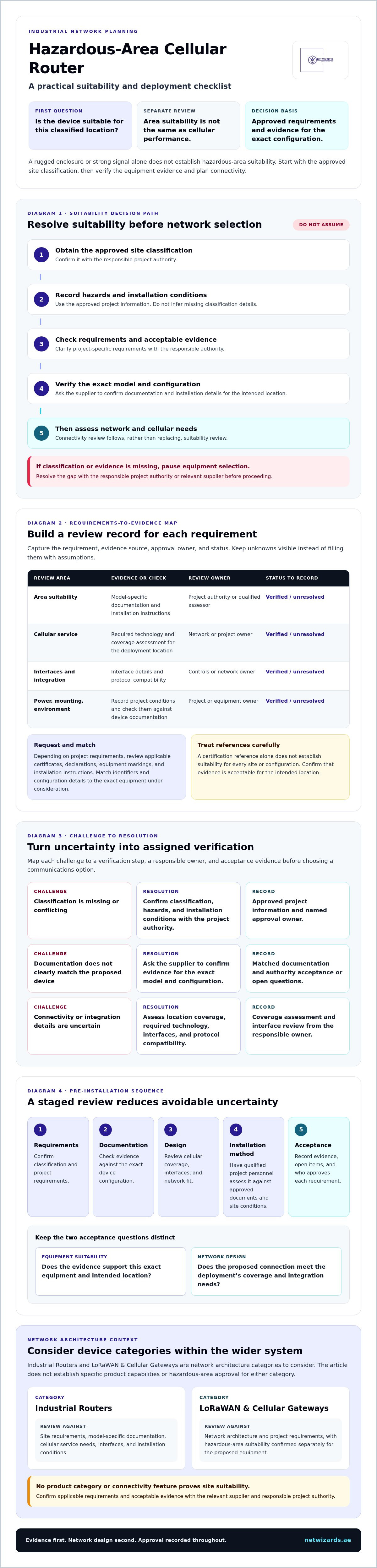
Decision flow: establish suitability before assessing connectivity
Approved site classification → Record hazards and installation conditions → Confirm project requirements and acceptable evidence → Verify documentation for the exact device and configuration → Proceed to network and cellular assessment
If classification or evidence is missing, pause equipment selection and resolve the gap with the responsible project authority or relevant supplier.
Which hazardous-area cellular router criteria should you verify?
Turn the approved site requirements into a procurement record before comparing devices. For each item, capture the requirement, its evidence source, and the person or authority responsible for approval. This makes missing information visible and prevents a general product description from being treated as proof of suitability.
Request documents for the exact router model and proposed configuration. Depending on project requirements, the evidence set may include applicable certificates, declarations, equipment markings, and installation instructions. Match model identifiers and configuration details to the equipment under consideration. Ask the responsible project authority or qualified assessor to confirm whether the documentation is acceptable for the intended location.
Build a requirements-to-evidence matrix
Record unresolved values explicitly. Don’t infer a specification from a product family, similar model, or sales summary.
Requirement | Evidence to request | Approval owner | Status
Area suitability | Model-specific documentation and installation instructions | Responsible project authority or qualified assessor | Verified / unresolved
Cellular service | Required technology and coverage assessment for the deployment location | Network or project owner | Verified / unresolved
Interfaces and integration | Confirmed interface details and protocol compatibility | Controls or network owner | Verified / unresolved
Power, mounting, and environment | Supplier documentation checked against project conditions | Engineering owner | Verified / unresolved
Verify connectivity and integration requirements
Define the required cellular technology from the project architecture, then assess operator coverage at the actual installation location. Coverage assumptions for a wider area may not reflect signal conditions where the device will be mounted. Confirm interfaces and integration protocols against connected equipment and systems. Don’t assume compatibility from the router category alone.
Specify power, mounting, and operating conditions, then compare them with documented device capabilities. If the design requires remote management, firewall controls, or VPN connectivity, request evidence for those functions on the proposed model and configuration. Treat every unconfirmed capability as an open procurement question, not an established feature.
This evidence-led process gives engineering and procurement a shared basis for review, helps reduce late-stage substitutions, and keeps network design aligned with site requirements. For help organizing Industrial Networking equipment requirements and documentation questions, discuss your project requirements with NET WIZARDS L.L.C. Confirm hazardous-area documentation with the relevant supplier and project authority before selecting a hazardous area cellular router.
How do you assess router risks, constraints, and alternatives?
Turn risks into project actions rather than general warnings. For each constraint, identify the verification step, mitigation owner, and evidence required for acceptance. This makes unresolved issues visible before they affect equipment selection or commissioning.
Risk-to-action map
Incomplete area documentation → Confirm classification with the responsible project authority → Project authority → Approved classification record
Uncertain cellular coverage → Assess coverage at the intended installation location → Network owner → Site-specific assessment and acceptance decision
Unclear interfaces or data flows → Review connected systems and required exchanges → Controls or network owner → Documented interface review
Environmental mismatch → Compare site conditions with the exact device documentation → Engineering owner → Recorded technical review
Missing equipment evidence → Request model-specific documents from the supplier → Procurement and project authority → Evidence accepted or gap recorded
Each challenge calls for a different response. A coverage assessment can reveal weak service at the planned mounting position, prompting the project team to reassess placement or evaluate another approved communication path. An interface review can uncover incompatible connection requirements or unclear data ownership before integration work begins. Environmental conditions also matter: compare the actual installation conditions with documented equipment limits rather than assuming that an industrial product category establishes suitability.
Documentation gaps need an explicit hold point. If classification evidence, configuration details, or installation information is incomplete, assign an owner and resolve the gap before treating the device as acceptable. This prevents a tentative assumption from becoming a procurement or installation decision.
When should teams compare another network path?
Compare cellular with another option only when the project’s approved requirements call for it. Evaluate each path against actual coverage, availability expectations, cybersecurity controls, and operational needs. A second connection does not automatically provide redundancy. The architecture must define how the paths operate, and testing must demonstrate the behavior the project intends to accept.
For broader design context, review the mission-critical industrial networking architecture guide. If cellular is under consideration as part of the network design, the industrial 5G router solutions overview provides related context. Neither reference replaces a site-specific assessment or evidence for a proposed hazardous area cellular router.
This method creates a decision trail that links each risk to an accountable owner and verifiable acceptance evidence. Teams can compare alternatives against consistent criteria, identify blockers earlier, and avoid claims of uninterrupted operation unless design and testing support them.
What deployment checks reduce uncertainty before installation?
Use formal hold points to prevent unresolved requirements from following equipment onto site. Before a hazardous area cellular router reaches installation, confirm that its identity, configuration, supporting documents, and approval status match the project record. Resolve open classification or technical questions first. Delivery alone is not evidence of readiness.
Complete the pre-installation review
Review the proposed installation against approved project documents. Qualified project personnel must validate installation methods against those documents and site requirements. Check the mounting location, cable routes, antenna placement, power arrangements, and environmental conditions. If the proposed arrangement differs from the approved design or supplier instructions, pause and obtain the required review before proceeding.
- Requirements: Confirm the site requirements and acceptance criteria with the responsible project authority.
- Documentation: Match the exact device and configuration to the applicable evidence and installation instructions.
- Design: Review mounting, cabling, antenna placement, power, and environmental constraints against approved documents.
- Installation: Obtain validation from qualified project personnel before work begins.
- Acceptance: Define required checks, evidence, and sign-off owners before commissioning.
Installation-readiness flow
Requirements confirmed | Project authority | Approved requirements record
Device and documents matched | Procurement and technical owner | Model-specific documentation and configuration record
Design and method reviewed | Qualified project personnel | Approved design and installation method
Ready to install? | Project acceptance owner | All open items resolved, otherwise pause and assign an owner
Record commissioning and handover
Commission against project-defined acceptance criteria, not informal expectations. Record the approved device configuration and network settings, then verify cellular connectivity and each required system interface. Preserve test results, the test method, any exceptions, and the responsible personnel. If a result falls outside the agreed criteria, document the issue and its resolution before acceptance.
Handover should provide operations with a controlled record of what was installed and tested. Include current document revisions, maintenance instructions, configuration records, and the named owner for operational escalation. This reduces ambiguity during future changes and helps the operating team distinguish approved settings from later modifications.
A consistent readiness and handover process gives engineering, installation, and operations a shared evidence trail. It also makes installation blockers visible while there is still time to resolve them through the appropriate project owner.
How can an industrial networking partner support the next step?
Resolve site, equipment, network, and integration questions before selecting a product. This helps procurement compare options against documented requirements, gives engineering a clearer basis for system design, and exposes evidence gaps before they become installation delays. A networking partner can help assess how industrial connectivity equipment fits the wider architecture, but the project authority and relevant supplier must confirm hazardous-area requirements and evidence.
NET WIZARDS L.L.C supplies Industrial Networking equipment, including Industrial Routers and LoRaWAN & Cellular Gateways. These are product categories, not a claim that a specific device is approved for a hazardous area. Confirm the exact model, configuration, documentation, and intended installation conditions with the relevant supplier before making a selection. For a separate environmental-design consideration, see the high-temperature industrial router engineering guide.
What verified NET WIZARDS L.L.C capabilities are relevant?
NET WIZARDS L.L.C has been in business for 20 years. That company history is not evidence of hazardous-area certification for any product. Its Industrial Networking range can be considered as part of a broader connectivity architecture, alongside project-defined requirements for connected systems, data flows, and interfaces. Discuss specific requirements without assuming that a particular product has unverified features or approvals.
What should you prepare before discussing a project?
A focused project discussion starts with the documents and questions that govern selection. Prepare:
- The approved site classification and intended installation conditions, including relevant environmental constraints.
- Required cellular connectivity, coverage information for the installation location, and any alternative network paths under consideration.
- Required interfaces, protocols, connected systems, and expected data flows.
- Security and integration requirements, including any remote-management, firewall, or VPN needs that the project must verify.
- A list of open evidence gaps, such as unconfirmed model details, equipment documentation, or approval owners.
Sharing this information helps separate confirmed requirements from assumptions and focuses attention on questions that still need resolution. It also supports a more coherent review of how Industrial Networking equipment fits the intended system, without substituting a product discussion for the project authority’s suitability decision.
Make the Next Connectivity Decision with Confidence
A sound hazardous area cellular router selection begins with the approved site classification, not a preferred device or cellular feature. Verify that equipment documentation matches the exact model, configuration, and intended location, then resolve coverage, interface, and environmental questions against project requirements.
Keep the decision traceable through design review, installation validation, and commissioning. Clear owners and recorded acceptance evidence help prevent unresolved assumptions from carrying into operations. Cellular connectivity is one part of the architecture. Equipment suitability and system integration need their own reviews.
NET WIZARDS L.L.C supplies Industrial Networking equipment, including Industrial Routers and LoRaWAN & Cellular Gateways. These offerings can be considered as part of a project’s connectivity discussion, but hazardous-area documentation must still be confirmed with the relevant supplier and project authority.
Bring the site documents, network needs, and open questions together before procurement. A disciplined review gives your team a clearer path to a connectivity design that fits the project.
Frequently Asked Questions
What is a hazardous-area cellular router?
A hazardous-area cellular router is a cellular networking device evaluated for use in a specific classified area against that project’s requirements. Cellular connectivity describes how it transfers data, not whether it’s suitable for the installation environment. Suitability depends on the approved area classification and evidence for the exact device, configuration, and intended location. Confirm these details with the relevant supplier and responsible project authority before selection or installation.
Can a standard industrial cellular router be used in a hazardous area?
Not unless its documented suitability has been confirmed for the specific classified area and project requirements. Industrial or rugged construction alone doesn’t demonstrate hazardous-area suitability, and an external enclosure doesn’t automatically make an unevaluated device appropriate for that location. Before procurement, verify the exact model and configuration, installation conditions, and applicable evidence with the supplier and responsible project authority. If a requirement remains unresolved, treat the device as unapproved for that application.
How do I verify whether a cellular router is suitable for a classified area?
Start with the approved area classification and applicable project requirements from the responsible project authority. Then ask the supplier for documentation tied to the exact router model and proposed configuration, including relevant markings and installation instructions. Compare this evidence with the intended location and installation conditions, and have the responsible authority or qualified assessor confirm acceptability. Don’t infer a zone, protection level, or suitability from a similar model or general product description.
What documentation should I request from a hazardous-area router supplier?
Request applicable certificates, declarations, equipment markings, and installation instructions required by the project. Ensure each document identifies the exact model and configuration under consideration, and check that any conditions or limitations align with the intended installation. Also request confirmed information on interfaces, cellular capabilities, power, and environmental ratings where these affect the design. Ask the responsible project authority or qualified assessor to confirm that the evidence meets project requirements before procurement approval.
Does a cellular router need ATEX or IECEx certification?
That depends on the applicable project requirements and the authority responsible for accepting equipment evidence. ATEX and IECEx are not interchangeable assumptions, and a reference to either scheme doesn’t prove that a particular router configuration is acceptable for every location. Confirm which evidence the project requires, then check that the documents identify the exact model and proposed configuration. The supplier can provide product documentation, while the responsible project authority confirms whether it is acceptable for the application.
Can a hazardous-area cellular router connect to SCADA systems?
It may support a SCADA connection if the router’s verified interfaces and supported protocols match the system architecture. Confirm required data flows, network settings, and security controls with the controls and network owners, then verify those functions on the exact device configuration. Separately, confirm area suitability and installation requirements. A successful SCADA integration test demonstrates communication performance against project criteria, but it doesn’t establish hazardous-area suitability.
What should a hazardous-area router commissioning checklist include?
Include confirmation of the approved device identity and configuration, current documentation, and validated installation method. Record network settings and configuration control details, then test cellular connectivity and each required system interface against project-defined acceptance criteria. Document test results, exceptions, and responsible personnel. Handover should include current document revisions, maintenance instructions, and operational escalation ownership. Qualified project personnel must validate installation methods against approved documents and site requirements before work proceeds.